Copilot Squad
I designed and built Copilot Squad, a workspace for running a small team of GitHub Copilot agents on one repository. Each agent has a name and a job. You brief them from one command line, they pass work to each other, and anything risky waits until you say yes.
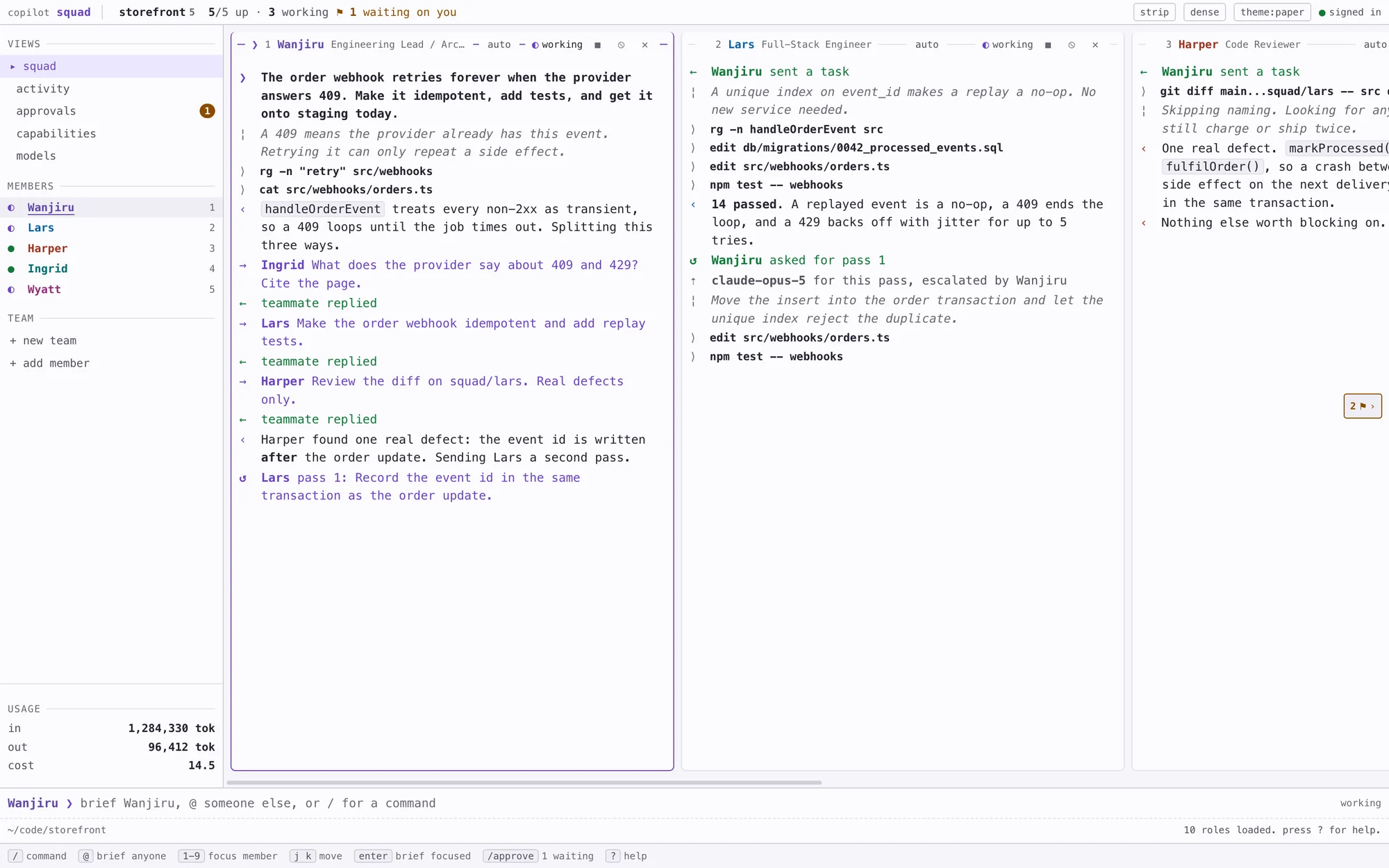 , open full size
Why I built it
One agent in one chat is a bottleneck. Real work splits up: someone reads the docs, someone writes the fix, someone else checks it. I wanted to run several Copilot agents on the same repository at the same time and still know what each of them was doing.
It’s for engineers who already have a Copilot seat and spend their day in a terminal. Squad sits next to their editor as a third window, and they check it in quick glances many times an hour. Is anyone stuck? Is anyone waiting on me? Did the thing I asked for land?
The test I set myself was this: you brief the squad, go and do something else, come back, and you can work out what happened from the screen alone.
How a squad works
A team is a name and a repository. Each member is an agent with a name, a role, a model and its own Copilot session. Ten roles come with it, from engineering lead and full-stack engineer to code reviewer, SRE, researcher and technical writer.
Five of those roles can pass work on. A lead can give a teammate a task, then send it back for another pass. The teammate keeps its own context, so the feedback lands on the work it just did, and the lead can ask for a stronger model for that one pass. The limits on how far work can be handed on are checked by the server, because a limit written into a prompt is only a suggestion.
Every member works in its own git worktree on a branch called squad/<name>, so two agents can’t write over each other’s files. You review and merge their work with ordinary git.
Designed like a terminal tool
The people using it run tools like lazygit and k9s, so I designed Squad to sit in that family. It’s monospace throughout. Each pane has its title set into its top border, there’s a status line along the top, and a command line and a row of keys along the bottom. Thin lines and alignment do the job that cards and shadows do in most apps.
There’s one command line for everything. Plain text goes to whoever has focus, and a line that starts with @name goes to someone else. Anything you can click, you can also type.
I kept out the terminal clichés: no green on black, no scanlines, no text that types itself out. I kept out the chat app ones too, so there are no speech bubbles, avatars or typing dots.
Two themes and two layouts
Paper is the default: a faintly lilac white with violet ink. People look at it from bright offices, and it stands apart from the dark editor next to it. Ink is a violet charcoal that I designed on its own rather than inverting paper. Both are built in OKLCH around a single violet hue.
The default layout is a filmstrip of full-height panes that you scroll sideways. The grid shows every pane at once. Text can be dense or comfortable, and Squad remembers all three choices.
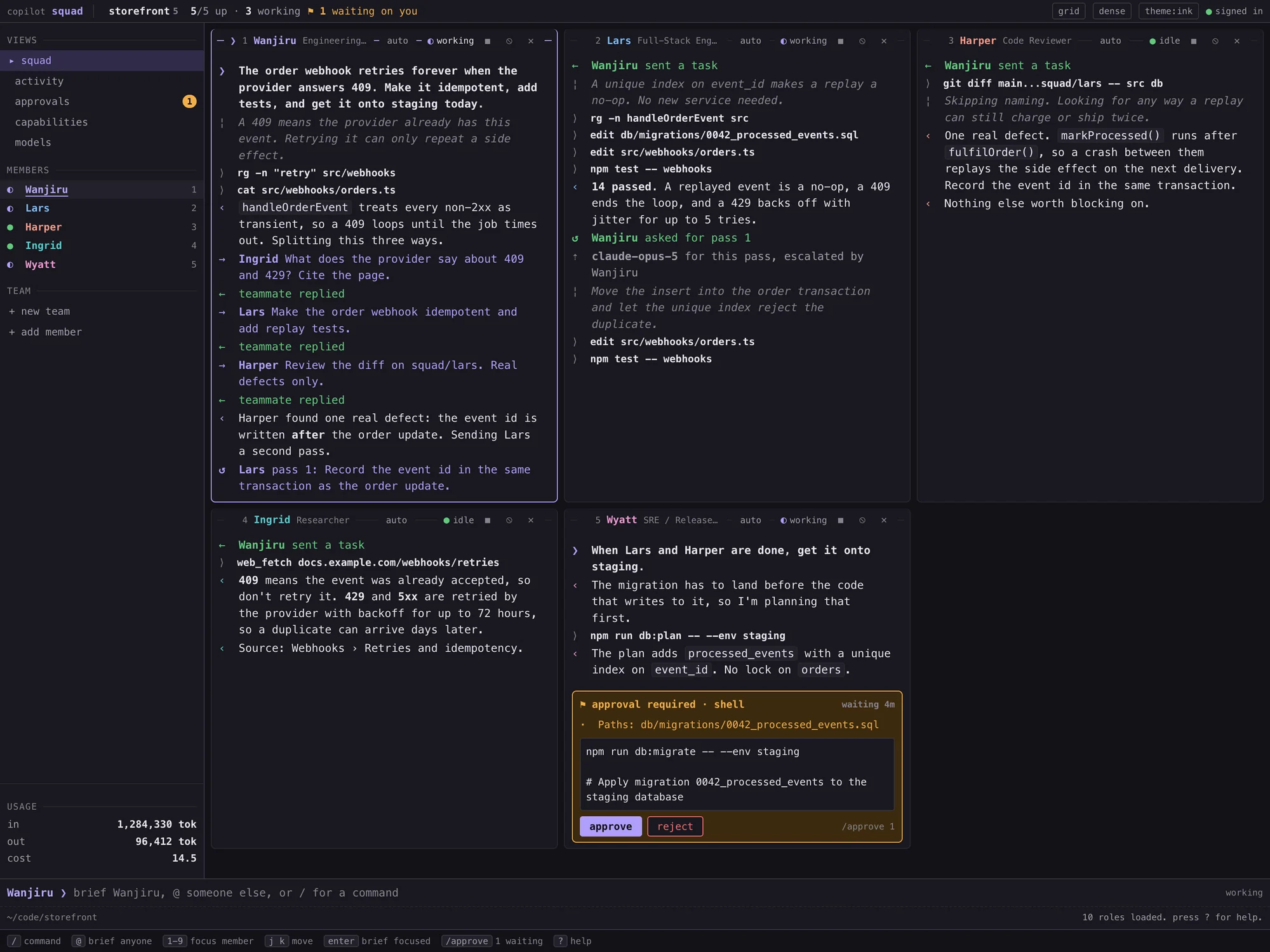 , open full size
A blocked agent is never hidden
An agent waiting for your approval is the most urgent thing in the product, so it has to be easy to find from anywhere. The request appears inside the agent’s pane as an amber block, never as a pop-up. Above the command it lists what the runtime flagged, such as the files it may touch or the addresses it may reach. You answer it there, or type /approve 1.
The waiting count also shows in the status line, in the sidebar and in the browser tab’s title. In the filmstrip, each edge shows how many members are off screen and the most urgent thing any of them is doing. It turns amber when one of them is waiting on you, and clicking it takes you straight there.
Requests don’t time out, because a timeout that says no for you looks exactly like a decision you made. Long commands aren’t quietly cut short either. Past 1,400 characters a button tells you exactly how many are left, because a hidden tail is where the part you wouldn’t approve would go.
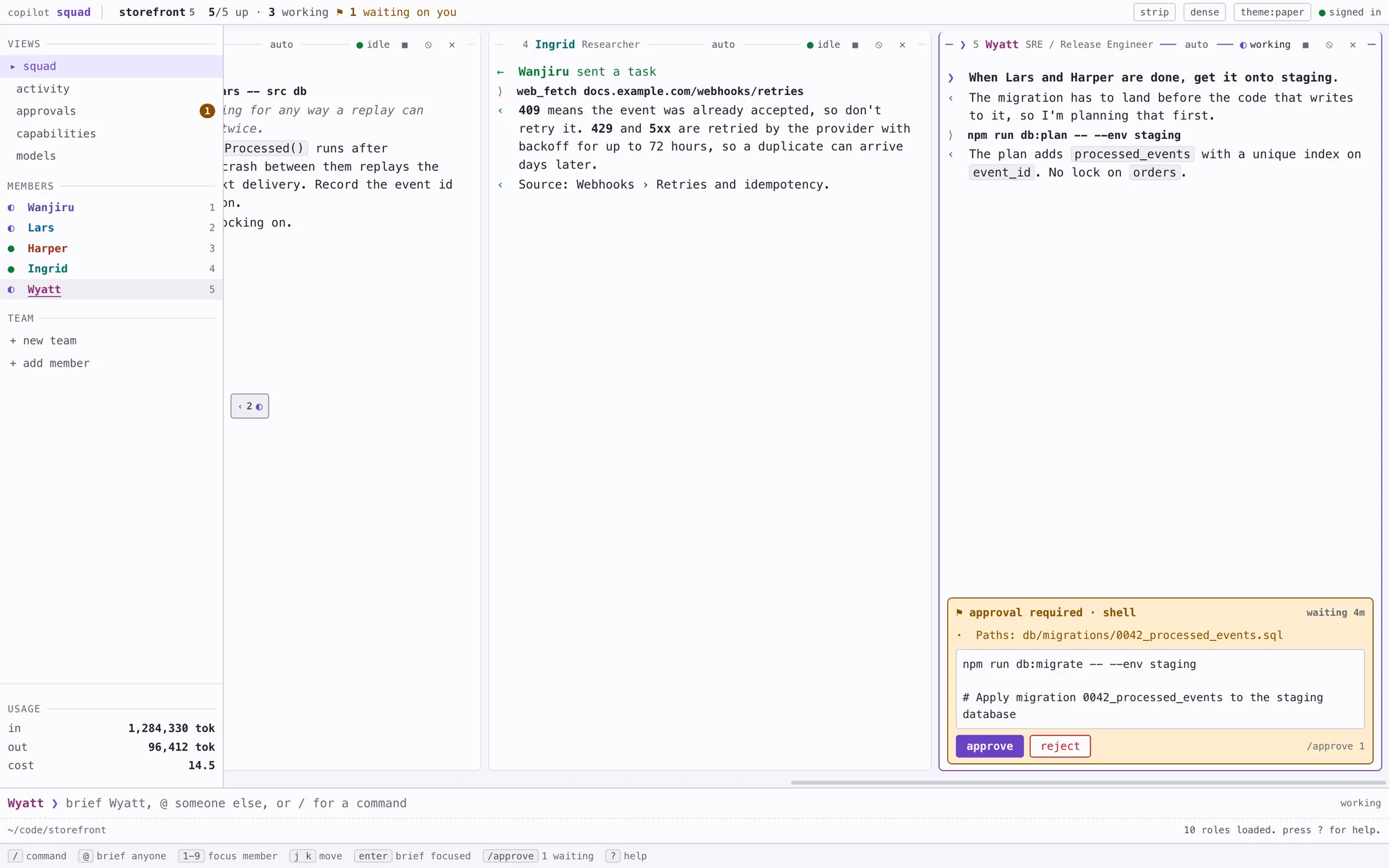 , open full size
Status before words
Every state has a glyph and a word as well as a colour: idle, working, starting, stopped, error and waiting on you. Each member gets one of seven colours, chosen so they stay distinct for people with red-green colour blindness, and the colour always sits next to their name.
In a pane, each line starts with a glyph in a narrow gutter. ❯ is your brief, → is work handed out, ← is work coming back, ↺ is a revision and ⇡ is a switch to a stronger model. That gives real hanging indents, so a pane reads like a log rather than a chat.
I checked every status colour against its own pale tint as well as the page, because the approval block puts amber text on pale amber. The first amber measured 4.48:1 there, just under the AA line, so I darkened it. The weakest of those pairs in either theme is now 4.86:1. Only three things ever move: the cursor, the dot on a working member and the spinner. Reduced motion stops all three.
What happened while I was away
Everything the squad does goes into a log file on disk as it happens: briefs, hand-offs, revisions, model changes, approvals, errors, and how long each one took. The activity view shows the same entries, newest first, so a reload or a restart doesn’t lose the story.
An entry says one agent answered another after 94 seconds. It doesn’t say what the answer was, because Copilot already keeps each agent’s conversation. The only words the log keeps are your own briefs, cut to 400 characters, since nothing else would keep them. A panel in the sidebar adds up the tokens every turn uses, so you can see what the squad has spent.
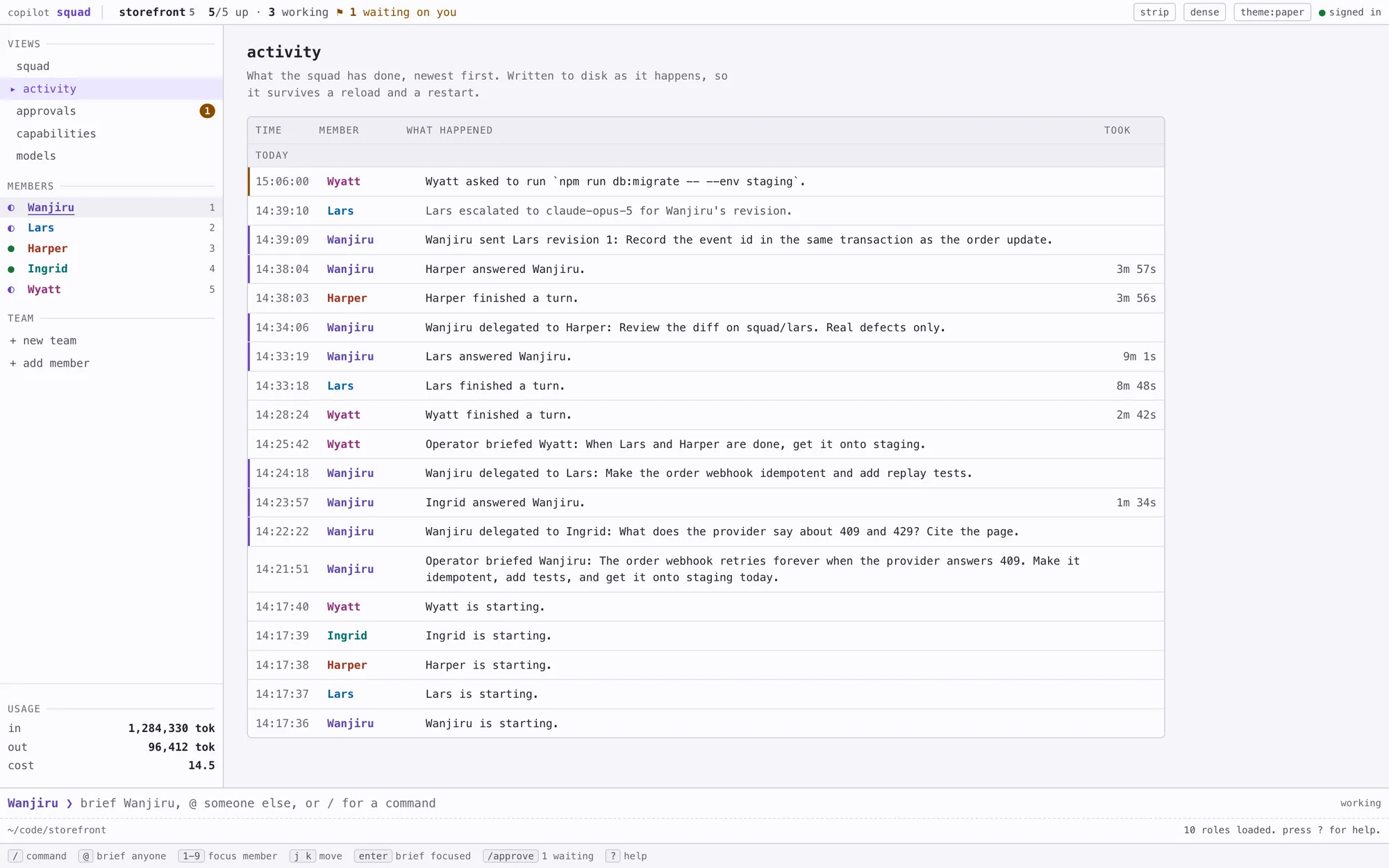 , open full size
How it’s built
It runs on the GitHub Copilot SDK, which drives Copilot through a real API instead of scraping a terminal. The server is Node with Express and WebSockets. The interface is plain JavaScript and CSS, with no build step and no web fonts, so nothing holds up the first paint. A small Swift app wraps it in a native macOS window.
Everyone runs their own copy, signed in as themselves, so each session is billed to their own Copilot seat. It only listens on the local machine, and it checks where each request came from, so another web page open in the same browser can’t drive your squad. The rules that matter most, like the delegation limits, approvals and the run log, have their own tests.
The team and repository in these screenshots are made up for this page.